The EnableFieldEmployeeLevel2UserSetup allows for non administrative users to set up AccuBuild TimeClock users in the AccuBuild User Maintenance Screen while maintaining full security menu blocking from ALL menu options in the AccuBuild Program.
When this advanced setting is enabled, the User Maintenance screen will control the settings for all users that are set to a level 2 security level. In addition, if a user logs into the AccuBuild System under the FIELDEMPLOYEESETUP user name, the User Maintenance screen will be blocked from any security related access settings.
NOTE: Once this feature is enabled, a series of implementation setup steps will be required by the Accubuild Support team for any company that enables this setting.
User Maintenance Screen:
This screen will enforce new security restrictions as outlined below which are only enabled when the user name FIELDEMPLOYEESETUP is used to login to the AccuBuild Program AND the new Advanced Setting 55 (above) is enabled. Both of these conditions MUST be met in order to enable the advanced security for this screen.
•FIELDEMPLOYEESETUP User: During the Implementation Setup steps (below), this user will be added and will only have access to the File | System Administrator | User Maintenance menu option. All other menus and options will be disabled for this user.
•Set FIELDEMPLOYEESETUP user level to a 3
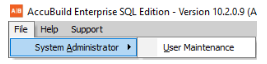
Warning: If you login with the FIELDEMPLOYEESETUP user and the Advanced Setting 55 is NOT enabled, you will get the following error message in order to prevent security breaches:
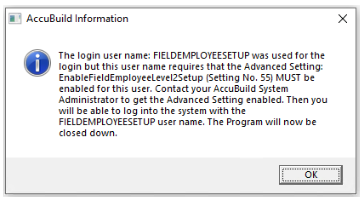
•User List: - Only Users that are set up with a security level of 2 will be displayed when the advanced security settings are enabled. If new users are added, they will be set to level 2 automatically.
The FIELDEMPLOYEESETUP user will be able to Add, Edit, and Delete Level 2 users ONLY.
Any other users that have access to the User Maintenance Screen will have full access as normal to the user settings, however, the Level 2 users will always enforce the pre-set security levels for level 2 users as long as the Advanced Setting 55 is enabled.
•Field Settings: - The following fields are disabled and set automatically for level 2 users:
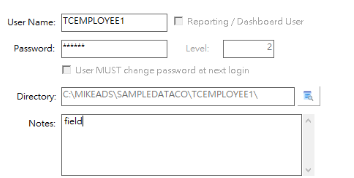
oReporting / Dashboard User - This setting is unchecked and disabled.
oUser MUST change password at next login - This setting is unchecked and disabled.
oDirectory: This setting will be set automatically based on the User Name and disabled.
oNotes: This field is set to field (for field employee) but is NOT disabled and may be edited if desired.
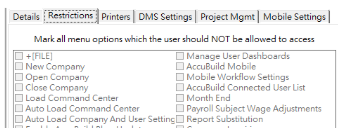
•Restrictions Tab: - The Restrictions Tab is disabled and the Main Module menu checkboxes (Payroll, Payables, Receivables, etc.) will be checked automatically for all level 2 users:
User Name Warning - Since the user list only includes level 2 users, there is a chance that a duplicate user name could be entered but the duplicate name is not in the user list. Just be aware that the following error message could be referencing a non level 2 user so you will need to pick a new user name if this occurs:
Menu Settings:
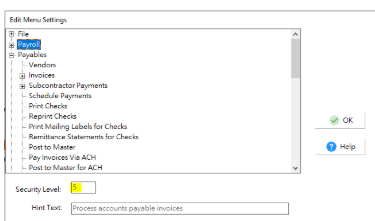
The new security settings for this feature rely on the menu security level settings. All menu Security Level settings MUST be set to Level 4 or higher. This ensures that all Level 2 users will NOT have access to any menu in the AccuBuild system AND that the FIELDEMPLOYEESETUP user only has access to the User Maintenance menu option. These menu settings will be handled in the Implementation Setup process.
Implementation Setup: There is an implementation process that needs to be done by the AccuBuild Staff on the back end database in order to complete the security settings for this feature. The following are the technical notes for the AccuBuild Team to implement:
-- 06.18.2025 SQL to update menu restrictions for new User Maintenance Project and Advanced Setting 55
-- We need to run the User Settings and Activity Report (Employee Reports) for a single date (date range) to produce the following files which
-- are used for the SQL Queries used to update the menu security on the back end via ARC
//%%%%%%%%%%%%%%%%%%%%%%%%%%%%%%%%%%%%%%%%%%%
-- (1) RUN the User Settings and Activity Report in AccuBuild - Note the User Name and User Folder that the report was run under
//%%%%%%%%%%%%%%%%%%%%%%%%%%%%%%%%%%%%%%%%%%%
// In AccuBuild - Run the User Settings and Activity Report for a single day (Today) in the date range of the report dialog
// These local user tables will be created from the above report
select * from ABMenuList
select * from ABUserGroupMenuList;
select * from UserMenuSecurityLevelSettings;
select * from UserSecuredMenuList_Top;
select * from UserSecuredMenuList_Sub;
//%%%%%%%%%%%%%%%%%%%%%%%%%%%%%%%%%%%%%%%%%%%
-- (2) Open ARC from the User Directory BASEUSER where the above report was run from
//%%%%%%%%%%%%%%%%%%%%%%%%%%%%%%%%%%%%%%%%%%%
//%%%%%%%%%%%%%%%%%%%%%%%%%%%%%%%%%%%%%%%%%%%
-- (3) RUN BACKUP of the DATA\MENUS file BEFORE making any changes
//%%%%%%%%%%%%%%%%%%%%%%%%%%%%%%%%%%%%%%%%%%%
/*
Declare @ImportTimeStamp Timestamp;
Declare @OriginalFileName String;
Declare @BackupFileName String;
Declare @BackupTimeStamp String;
Declare @SQLSTMT String;
@ImportTimeStamp = Current_TimeStamp(3);
@BackupTimeStamp = trim(convert(dayofmonth(@ImportTimeStamp),Sql_char))+'_'+
trim(convert(month(@ImportTimeStamp),Sql_char))+'_'+
trim(convert(year(@ImportTimeStamp),Sql_char))+'_'+
trim(convert(hour(@ImportTimeStamp),Sql_char))+'_'+
trim(convert(minute(@ImportTimeStamp),Sql_char))+'_'+
trim(convert(second(@ImportTimeStamp),Sql_char))+'_'+
trim(convert(frac_second(@ImportTimeStamp),Sql_char));
@OriginalFileName = 'MENUS';
@BackupFileName = trim(@OriginalFileName)+'_BACKUP_'+@BackupTimeStamp;
// Make Backup of BaseGlob (DATA) Dictionary File from User Connection
@SQLSTMT = 'Select a.* into '+trim(@BackupFileName)+' from gllink.'+trim(@OriginalFileName)+' a ;';
Execute Immediate @SQLSTMT;
*/
//%%%%%%%%%%%%%%%%%%%%%%%%%%%%%%%%%%%%%%%%%%%
-- (4) Verify the Menus Backup file exists BEFORE moving on to the next step
//%%%%%%%%%%%%%%%%%%%%%%%%%%%%%%%%%%%%%%%%%%%
//%%%%%%%%%%%%%%%%%%%%%%%%%%%%%%%%%%%%%%%%%%%
-- (5) Set the CompanyID Variable @CompanyID for the target company in the script below
//%%%%%%%%%%%%%%%%%%%%%%%%%%%%%%%%%%%%%%%%%%%
//%%%%%%%%%%%%%%%%%%%%%%%%%%%%%%%%%%%%%%%%%%%
-- (6) Run the following script to update the MENUS table
//%%%%%%%%%%%%%%%%%%%%%%%%%%%%%%%%%%%%%%%%%%%
Declare @CompanyID Integer;
@CompanyID = 36; // AccuBuild Sample Data Company
try
drop table AllABMenusList;
catch all
end;
--select x.MenuNameForSecurity into AllABMenusList
select x.* into AllABMenusList
from
(
select a.*,
case
when coalesce(TopMenuName,'') <> '' and coalesce(SubItemName,'') = '' and coalesce(Subitem2Name,'') = '' and coalesce(SubItem3Name,'') = '' then TopMenuName
when coalesce(TopMenuName,'') <> '' and coalesce(SubItemName,'') <> '' and coalesce(Subitem2Name,'') = '' and coalesce(SubItem3Name,'') = '' then SubItemName
when coalesce(TopMenuName,'') <> '' and coalesce(SubItemName,'') <> '' and coalesce(Subitem2Name,'') <> '' and coalesce(SubItem3Name,'') = '' then SubItem2Name
when coalesce(TopMenuName,'') <> '' and coalesce(SubItemName,'') <> '' and coalesce(Subitem2Name,'') <> '' and coalesce(SubItem3Name,'') <> '' then SubItem3Name
else
''
end as MenuNameForSecurity
from ABMenuList a
) x;
try
Drop Table DistinctABMenuList;
catch all
end;
select distinct MenuNameForSecurity into DistinctABMenuList from ALLABMenusList;
// insert the menu list into the MENUS table where they do not exist already
--select * from gllink.menus
insert into gllink.menus (CompanyNumber,MenuName,SecurityLevel)
select @CompanyID as CompanyNumber,MenuNameForSecurity as Menuname,5 as SecurityLevel from DistinctABMenuList where MenuNameForSecurity not in (select MenuName from gllink.menus where CompanyNumber = @CompanyID);
-- now update the menu settings for the File, SystemAdmin and User Maint to security level 3
update gllink.menus set securityLevel = 3 where MenuName in ('File1','SystemAdministrator1','UserMaintenance1') and companynumber = @CompanyID;
//%%%%%%%%%%%%%%%%%%%%%%%%%%%%%%%%%%%%%%%%%%%%%%%%%%%%%%%%%%%%%%%
-- (7) Test the security levels for the company - should be 3 menus at level 3 and all the rest at 5 or higher
//%%%%%%%%%%%%%%%%%%%%%%%%%%%%%%%%%%%%%%%%%%%%%%%%%%%%%%%%%%%%%%%
--select companynumber,securitylevel,count(*) as menucount from gllink.menus group by companynumber,securitylevel;
--select companynumber,securitylevel,count(*) as menucount from gllink.menus group by companynumber,securitylevel;
-- delete from gllink.menus where companynumber = @CompanyID and SecurityLevel IS NULL;
-- select * from gllink.menus where securitylevel = 3 order by companynumber,menuname;
--select a.*,Length(MenuNameForSecurity) as MenuNameLength from DistinctABMenuList a where length(MenuNameForSecurity) > 32;
/*
select x.* from
(
select count(*) as MenuNameCount,MenuNameForSecurity from AllABMenusList group by MenuNameForSecurity
) x where MenuNameCount <> 1;
select * from AllABMenusList where MenuNameForSecurity in ('AllTests9','CustomFormAssignments','DMProperties1')
*/
//%%%%%%%%%%%%%%%%%%%%%%%%%%%%%%%%%%%%%%%%%%%%%%%%%%%%%%%%%%%%%%%
-- (8) Update the menu restriction settings for the FIELDEMPLOYEESETUP User
//%%%%%%%%%%%%%%%%%%%%%%%%%%%%%%%%%%%%%%%%%%%
/*
select * from gllink.users where user_name = 'FIELDEMPLOYEESETUP';
-- Paste the following menu restriction string into the menu_restric field of the users table for the FIELDEMPLOYEESETUP users
NewCompany,Configuration1,MenuSettings1,UserGroups,assigndashboards,ABMobile,MobileWorkflowSettings,AccuBuildUserList,MonthEnd1,PRSubjToWageAdj,CustomReports1,CompanyInquiriesBtn,ModifyData1,AuditTrailTriggers,HistoricalFileMaintenance1,BatchLogInfo1,Payroll1,Payables1,Trucking1,Receivables1,JobCost1,Ledger1,Clients1,Reports,Orders1,Inventory1,Documents1,ProjectMgmt1,Scheduling1,Equipment1,Service1,
*/