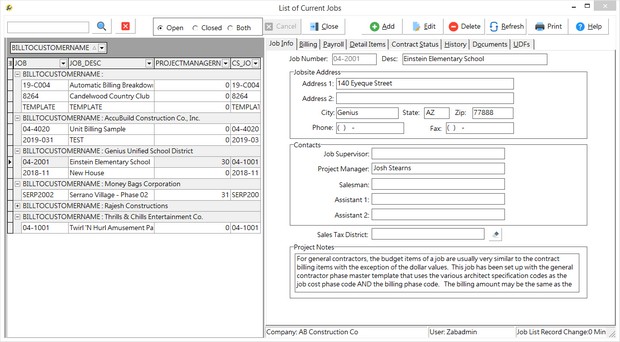
The Job Info Tab contains fields for the job name, job site address and contact information. By default, the job list displays only the 'open' jobs. You may also view completed jobs or all jobs by clicking on the status buttons at the bottom of the screen. The Print Button on this screen will print a copy of the Job Information Report for the job that is currently selected.
| Job |
Job numbers are assigned by the user and may consist of alpha/numeric characters. Job numbers may also include a decimal or hyphen but may not exceed eight characters in length. Jobs with invalid characters may cause exception errors when loading the Project Management Logs due to SQL Script errors. Invalid characters include: ~ ! @ # $ % ^ & * ( ) = { } [ ] > / " ; < > , ? '
| Contacts |
| Information for the Job Supervisor, Project Manager, Salesman, Assistant 1, and Assistant 2 fields must be set up in the Clients master list before they can be added to this screen. These fields can be used to secure access to specific jobs within the Project Management module based on whether the user is attached to one of these fields. For example, if user Joe and user Tom have been linked to job 04-1001 as the Project Manager and Assistant 1 respectively, but they have not been linked to any other jobs, then they will only have access to job 04-1001 in the PM module if it has been restricted in this fashion. Please refer to the User Maintenance option with the System Administrator (File) module for more information. |
•The five contact field labels can be customized using the advanced setting 'EnableCustomJobRoleLabelsOnJobList' in System Administrator.
| Sales Tax District |
| This field has been added to the job master list for future reporting purposes. |
| Project Notes |
| Unlimited general notations about a job may be entered in this field. |
Print Button
This options prints a copy of the Job Information Report (JcJobs.rpt) for the current job.