This option is used to view single jobs at a time in the Project Manage Log to enhance data refresh and screen load time performance.
NOTE: This is a company wide setting and will affect ALL users that access the PM Log.
When this setting is enabled, the Project Management log will work with one job at a time by controlling the Job Filter Settings as outlined below:

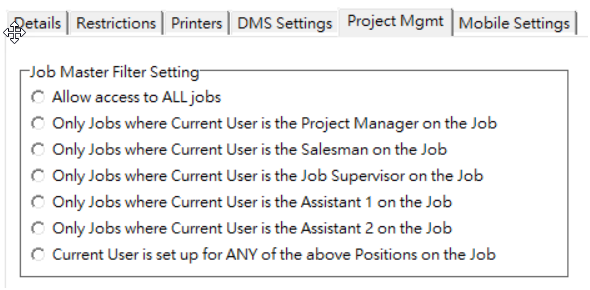
Job Activity: The Job Activity option will be set to All Jobs and will be disabled. The user will NOT be able to change this option. The All Jobs setting will ensure that the job list in the Single Job: drop down list will contain ALL the jobs that the user has access to based on the user’s settings for the PM Log (Refer to Project Mgmt tab of the User Maintenance Screen for more information on the job filter settings).
Single Job: The Single Job option will be checked and disabled so that it cannot be changed. The drop down job list will contain all the jobs that the user has access to based on the Open, Closed, or All Jobs job filter setting.
User Maintenance - Project Mgmt Tab - Job access options:
With this new Advanced Setting enabled, the Project Management Log should load faster and refresh faster when the job selection is changed. In addition, the individual log edit screens should load and close faster.